Overview
Gain hands-on experience with powerful open-source enterprise server solutions with Proxmox VE 8: Setup and Management labs. Learn how to install and configure Proxmox VE, deploy and modify virtual machines and containers, and understand storage and backup solutions.
Learn more about Proxmox: Proxmox Virtual Environment
NDG's Proxmox VE 8: Setup and Management labs have received a major upgrade with our Interactive Content update. This exciting update brings a richer, more engaging learning experience through our new HTML5 content viewer. You'll now have access to a wealth of resources within the lab environment, including: Lab Exercises, Videos, Assessments and Grading, Integrated Questions with Instant Feedback, and Challenge Labs. To take advantage of the Interactive Content update, your NETLAB+ system must be at version 22.8.7 or higher.
Lab Exercises (25 labs)
| # | Title |
|---|---|
| 1 | Accessing the Lab Environment |
| 2 | Installing Proxmox VE |
| 3 | Basic Setup and Configuration |
| 4 | Users, Groups, and Permissions |
| 5A | Deploying Virtual Machines |
| 5B | Deploying Containers |
| 6 | Modifying Virtual Machines and Containers |
| 7 | Cloning and Container Templates |
| 8 | Local Storage |
| 9 | Networked Storage |
| 10 | Backup |
| 11 | Proxmox Backup Server |
| 12 | Networks |
| 13 | Command Line Interface (CLI) |
| 14 | Clustering and High Availability |
| 15 | Challenge Lab |
| Assessment 01 | Introduction to Proxmox VE |
| Assessment 02 | Proxmox VE Subscriptions and Repositories |
| Assessment 03 | Proxmox VE Installation |
| Assessment 04 | Proxmox VE GUI Navigation |
| Assessment 05 | Proxmox VE Virtual Storage |
| Assessment 06 | Proxmox VE Virtual Networking |
| Assessment 07 | Proxmox VE User, Virtual Machine and Container Management |
| Assessment 08 | Proxmox VE Backup Server Configuration |
| Assessment 09 | Proxmox VE Clusters |
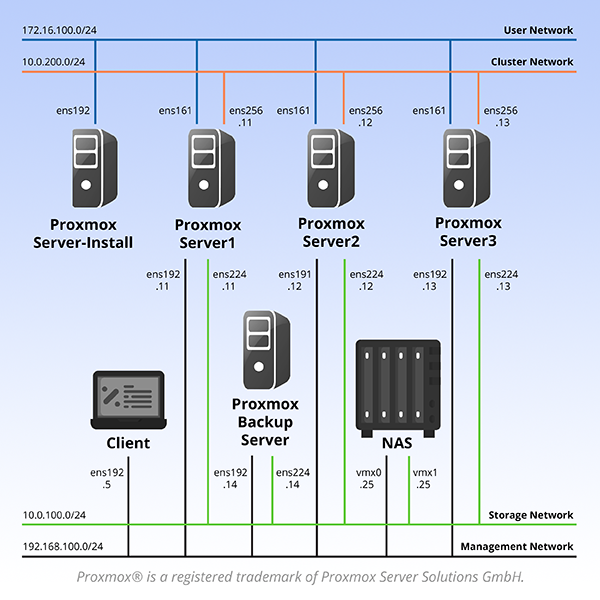
Pod Topology
Proxmox VE 8: Setup and Management Pod
Virtual Machines
Documentation & Resources
Setup: Install Proxmox VE 8: Setup and Management via the Course Manager. See the Admin Guide →
Ready to deploy this lab?
Get a quote for NETLAB+ and start running hands-on labs in your institution.
Get a Quote →